
CAS is an Open Source Single Sign On Server – http://www.jasig.org/cas. Iit can be integrated with both AD and LDAP. The task is easy if you know Spring and Tomcat – https://wiki.jasig.org/display/CASUM/LDAP, https://wiki.jasig.org/display/CASUM/SAML+1.1.
The problem is to get the AD/LDAP attributes with CAS Client. Following the documents above you are able to login against CAS but not to visualize in your application the mapped attributes.
Just a note in authenticationManager – deployerConfigContext.xml – change the credentianToPrincipalResolvers
 <property name="credentialsToPrincipalResolvers">
                        <list>

                        <bean class="org.jasig.cas.authentication.principal.CredentialsToLDAPAttributePrincipalResolver">
                                <property name="credentialsToPrincipalResolver">
                                        <bean class="org.jasig.cas.authentication.principal.UsernamePasswordCredentialsToPrincipalResolver"/>
                                </property>
                                <property name="filter" value="(sAMAccountName=%u)"/>
                                <property name="principalAttributeName" value="sAMAccountName"/>
                                <property name="searchBase" value="cn=Users,dc=pssupport"/>
                                <property name="contextSource" ref="contextSource"/>
                                <property name="attributeRepository">
                                        <ref bean="attributeRepository"/>
                                </property>
                        </bean>
                </list>
   </property>
This because CAS need to be configured in order to expose attributes. You have two ways to to that:
Using CAS services console (https://localhost:8433/cas/services). If this is not enable add the user to ROLE_ADMIN in deployerConfigContext.xml and configure CAS properties – https://wiki.jasig.org/display/CASUM/Configuring. Once you are in you can configure the attributes to visualize.
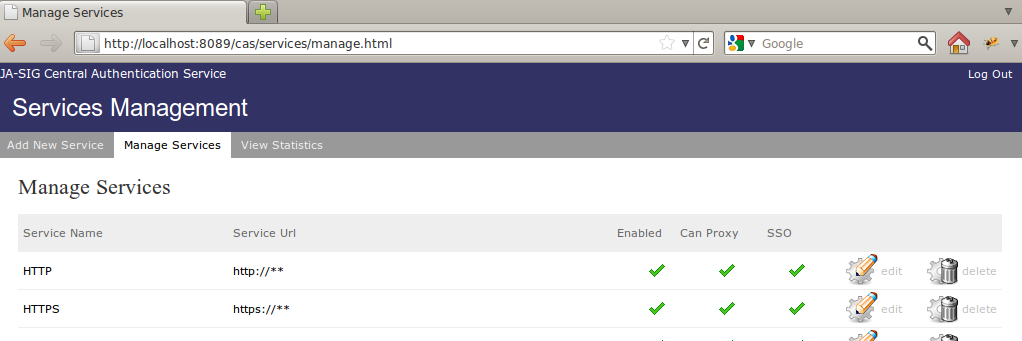
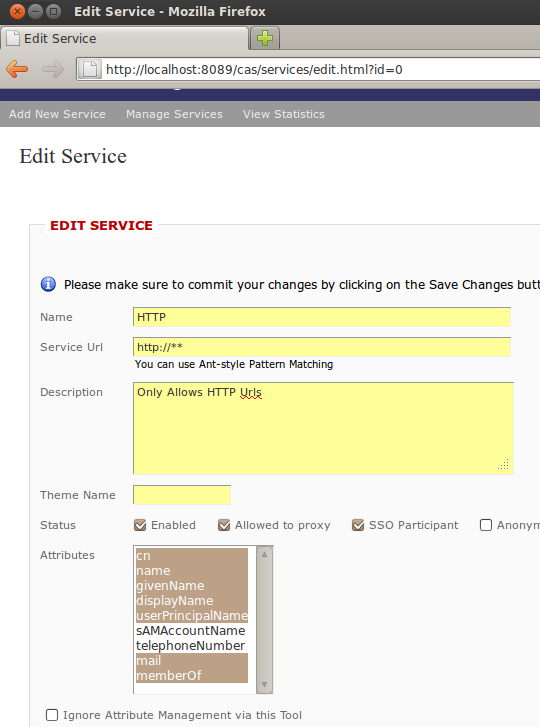
Setup the org.jasig.cas.services.InMemoryServiceRegistryDaoImpl to expose by default the attributes. To do so edit the deployerConfigContext.xml, locate the deployerConfigContext.xml and add to HTTP and HTTPS registeredServices the allowedAttributes property as in this example
<bean class="org.jasig.cas.services.RegisteredServiceImpl">
                        <property name="id" value="0" />
                        <property name="name" value="HTTP" />
                        <property name="description" value="Only Allows HTTP Urls" />
                        <property name="serviceId" value="http://**" />
                        <property name="allowedAttributes">
                  <list>
                        <value>cn</value>
                        <value>name</value>
                        <value>givenName</value>
                        <value>displayName</value>
                        <value>userPrincipalName</value>
                        <value>sAMAAccountName</value>
                        <value>telephone</value>
                        <value>mail</value>
                        <value>memberOf</value>
                  </list>
                </property>
restart CAS, login with your client and you should see now the attributes.

 Isola Software
wonderful article for CAS LDAP weblogic
Thanks! I hope that has helped you 🙂
If i had not got your blog here , i would have spent hours on searching correctly the mechanisms to implement AD versus CAS.
Hello all, I am pretty new with CAS. I need deep help from you. I could setup CAS, but what I have now is userID=password and I want to change this authentication to Active Directory and LDAP.
anytime I make some changes in deployerConfigContext.xml and replace org.jasig.cas.authentication.handler.support.SimpleTestUsernamePasswordAuthenticationHandler
with somethings that I googled , I get error below.
=========================================================
HTTP Status 404 – /cas
type Status report
message /cas
description The requested resource (/cas) is not available.
Apache Tomcat/7.0.21
=========================================================
Please help me if anyone know how too setup CAS + Active Directory and LDAP
thanks.
Hi Ali,
this usually happens when cas has a spring error and tomcat don’t deploy the web app. Please open your logs/catalina.out log file and look for an error. Post the error here, may be it’s just an typo error in your files. Have you read this doc https://wiki.jasig.org/display/CASUM/LDAP?
Hi,
When I go to services manager, I cannot see further fields to choose from. LIke you have shown under your screen shot that you have fields such as
cn
name
givenName
But I only have
eduPersonAffiliation
uid
GroupMembership
any ideas why I am not getting other attributes?